How to find LOFT Application ?
Install the Application ( ANDROID )
Watch The Video Tutorial
Prerequisites
- Google account signed into the device.
- Sufficient storage space.
- A compatible Android version (minimum Android 9.0 or later).
Steps
- Open the Google Play Store app on your Android phone or tablet.
- In the Play Store search bar, type “Loft Elev8” (exact app name) and press Enter. If nothing appears, try these alternate searches:
LoftLoft Elev8
- From the search results, tap the app that shows the developer CONVASYS TECHNOLOGIES PVT. LTD and an icon matching the Loft brand.
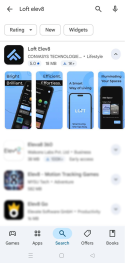
- On the app page, verify details (rating, number of downloads, screenshots) to ensure this is the official listing. Then tap Install.
- Wait for the download and installation to complete, then tap Open.
- The first time the app runs it may ask for permissions (Bluetooth, location, camera). Review and accept permissions necessary for the features you will use.
Install the Application ( IOS )
Watch The Video Tutorial
Prerequisites
- Apple ID signed into the device.
- Enough free storage for the app.
Steps
- Open the App Store on your iPhone or iPad.
- Tap the Search tab, then type “Loft Elev8” and search.
- In search results look for Loft Elev8 and confirm the developer name matches CONAVSYS TECHNOLOGIES PRIVATE LIMITED.
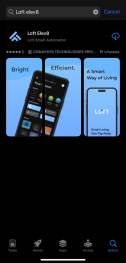
- Tap the app result to open the app listing. Then tap Get to download.
- Wait for install to complete, then open the app and follow first-time setup and permission prompts (Bluetooth, location, camera as required).