Link with Gateway
This guide explains how to link your Gateway with the LOFT App, so it can connect to your LMC system and operate devices over your local network.
Setup Requirements
Before linking the Gateway, ensure you have the following:
- LOFT App
- Gateway
- LMC
- Assigned System IP of your LMC
- Both the LMC and the Gateway connected to the same network
Steps to Link with Gateway
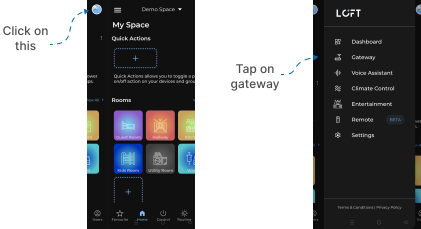
- Open the LOFT app.
- Tap the hamburger icon in the top-left corner.
- Select the Gateway option.
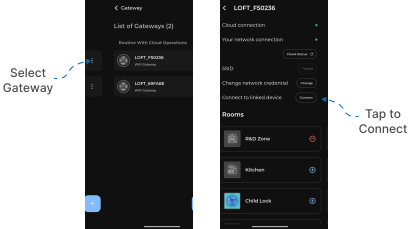
- Tap to open your required Gateway.
- Tap Connect, shown against Connect to Linked Device.
- An IP input field will appear.
- Enter the Assigned System IP of your LMC.
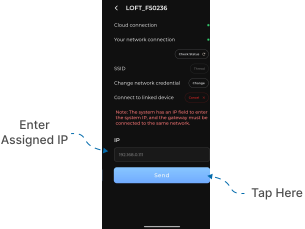
Note: The LMC system and the Gateway must be connected to the same network for the connection to succeed.
✅ Setup Complete! Your Gateway is now linked to the LMC system and ready to operate connected devices through the LOFT App.