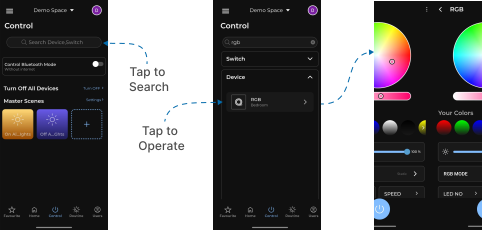
Device Search
This guide explains how to search for devices in the Loft App.
This feature allows you to quickly find and access your available devices and switches.
Watch The Video Tutorial
Steps to Search a Device
-
Open the Loft App
-
Navigate to the Control Section
- Go to the Control tab located next to the Home tab.
- At the top, you’ll see a search bar.

- Tap on the search bar to begin your search.
- Enter the device or switch name you want to search for.
- Two dropdowns will appear:
- One for Devices
- One for Switches
- If the searched name matches a device or switch, it will be displayed in the respective dropdown.
- Tap on the listed device or switch to directly open and operate it.