Home Off
This guide explains how to use the Home Off feature in the Loft App.
This feature allows you to turn off all the devices in your space with a single tap.
Watch The Video Tutorial
Steps to Use Home Off
-
Open the Loft App
-
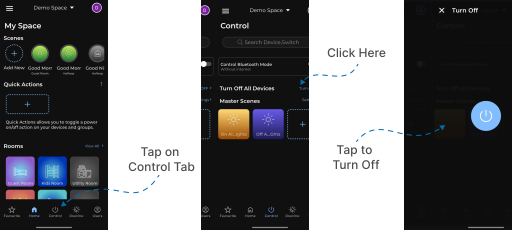
Navigate to the Control Section
- Go to the Control tab located next to the Home tab.
- Click on the Turn Off option shown next to Turn off all devices.
- The Turn Off screen will appear with a power button.
- Tap the power button to turn off all the available devices in your space.