Active Access
This guide explains how to Switch Active Account in the Loft App.
This feature allows you to seamlessly switch between multiple accounts — similar to how you can switch accounts in Instagram.
Watch The Video Tutorial
Steps to Switch Active Account
-
Open the Loft App
-
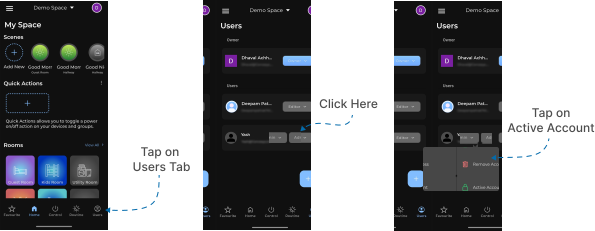
Navigate to the Users Section
- Go to the Users tab located at the bottom-right corner of the screen.
- Tap on the right-hand side of the user account that you want to make active.
- A few options will appear — select Active Account.
- Wait for a few seconds to complete the account switching process.
- Once done, your active session will switch to the selected account, allowing you to access and operate it seamlessly.
Note:
You can easily switch back to your previous account by repeating the same steps and selecting your original account as active.