Signup
Sign Up with Email
Watch The Video Tutorial
Steps:
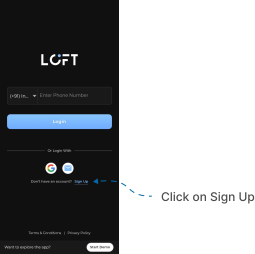
- Open the LOFT app. After the splash screen, the Login / Signup page appears.
- If you don’t already have a LOFT account, tap the Sign Up option at the bottom of the screen.
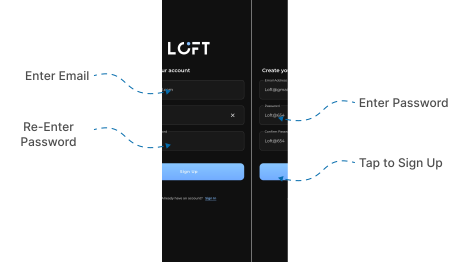
- A form appears with the following input fields:
- Email address
- Password
- Confirm password
- Enter a valid and active email address.
- Create a new, strong password (use at least 8 characters, mixing uppercase, lowercase, numbers, and symbols).
- Re-enter the same password in the Confirm password field to avoid mistakes.
- Tap the Sign Up button at the bottom of the form.
- A verification link will be sent to the provided email address.
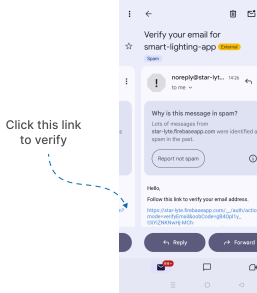
- Open your Gmail app (or email app) and locate the verification email.
- Check your Inbox first.
- If not found, check Spam or Important folders.
- Open the verification email and tap the blue verification link to confirm your account.
- After verification, return to the LOFT app. Enter your email and password and tap Login.
- You will now be successfully logged in to your LOFT account.
Important notes (Signup):
- Email verification is mandatory before login.
- If you don’t see the verification email, wait a few minutes and refresh the inbox.
- If still missing, request another verification email through the app.