Edit Group
This guide explains how to Edit Group in the Loft App. This feature allows you to Edit an existing Group.
Watch The Video Tutorial
Steps to Edit Group
-
Open the Loft App
- Navigate to the Rooms section.
-
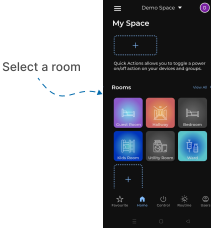
Select a Room
- Tap on the room where you want to Edit Group.
- Edit the Group
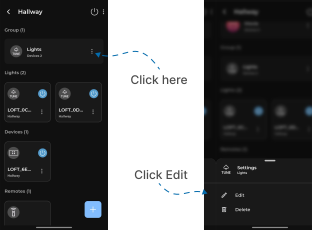
- In the Group Section, your existing created groups will be displayed.
- Tap on the three dots (
⁝) icon located on the right side of the group you want to Edit. - A popup menu will appear — select Edit.
- Update Group Settings
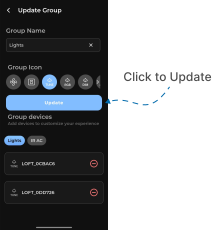
- The Update Group screen will appear.
- You can change the group name or select a new group icon.
- From the Group Devices section, you can remove existing devices or add new devices to the group.
- After making the desired changes, tap Update.
- Go back to the room, Your group will now reflect the updated name, icon, and device configuration.