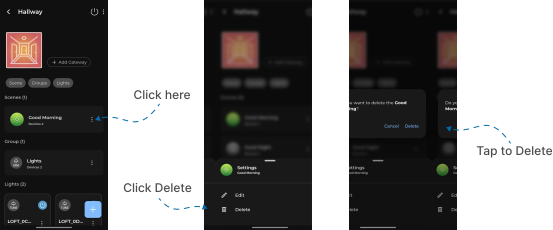
Delete Scene
This guide explains how to Delete Scene in the Loft App. This feature allows you to Delete an existing Scene.
Watch The Video Tutorial
Steps to Delete Scene
-
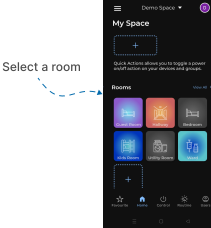
Open the Loft App
- Navigate to the Rooms section.
-
Select a Room
- Tap on the room where you want to Delete Scene.
- Delete the Scene
- In the Scene Section, your existing created Scenes will be displayed.
- Tap on the three dots (
⁝) icon located on the right side of the Scene you want to delete. - A popup menu will appear — select Delete.
- A confirmation dialog will appear; tap Delete again to confirm.
- The selected Scene will now be successfully removed from the room.
Note: A Scene cannot be deleted if devices exist in the Scene.
You must remove all devices from the Scene before deleting it.