Reorder Room
The Reorder Room feature in the LOFT application allows users to customize the sequence of rooms for easier navigation and personalized organization. Users can drag and drop rooms into their preferred order.
Watch The Video Tutorial
Steps to Reorder Rooms
-
Open the LOFT App
- Launch the application and navigate to the Rooms section.
-
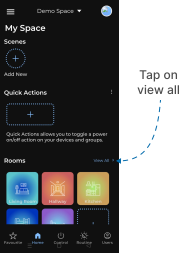
Access All Rooms
- On the right-hand side of the Rooms section, tap View All.
- You will be redirected to the All Rooms screen.
-
Locate Drag Handle
- On the left-hand side of each listed room, a drag handle is available.
-
Reorder a Room
- Press and hold the drag handle of the room you want to move.
- Drag the room upwards or downwards to the desired position.
-
Confirmation
- Release the drag handle.
- The room’s position will be updated instantly, reflecting the new order.
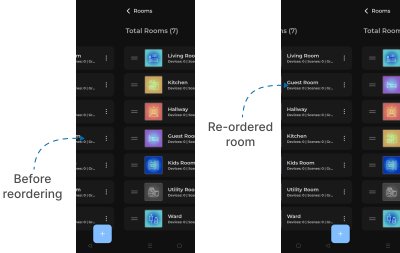
✅ Outcome: Rooms are successfully reordered as per your preference, improving navigation and personalization.