Edit Role
This guide explains how to Edit Access Role in the Loft App.
This feature allows you to change the access role of a user who already has access to your account space.
Watch The Video Tutorial
Steps to Edit Role
-
Open the Loft App
-
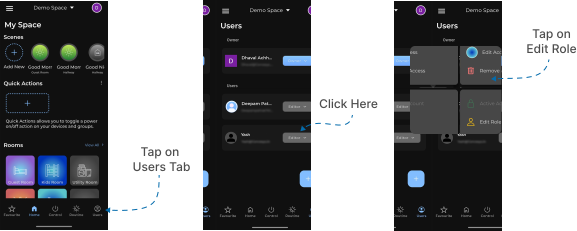
Navigate to the Users Section
- Go to the Users tab located at the bottom-right corner of the screen.
- Tap on the right-hand side of the user whose role you want to edit.
- A few options will appear — select Edit Role.
- Change User Role
- The Edit Role screen will appear with a dropdown menu.
- Select or change the user’s role from the dropdown options.
- After selecting the desired role, tap on Change Role.
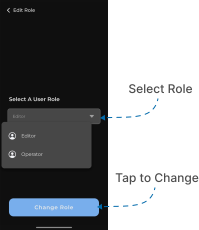
Once updated, the selected user’s permissions will automatically change based on the new role assigned.