Remove Access
This guide explains how to Remove Sharing Access in the Loft App.
This feature allows you to remove the access of a user who currently has access to your account spaces.
Watch The Video Tutorial
Steps to Remove Access
-
Open the Loft App
-
Navigate to the Users Section
- Go to the Users tab located at the bottom-right corner of the screen.
- Tap on the right-hand side of the user whose access you want to remove.
- A few options will appear — select Remove Access.
- A confirmation popup will appear.
- Tap Yes to confirm.
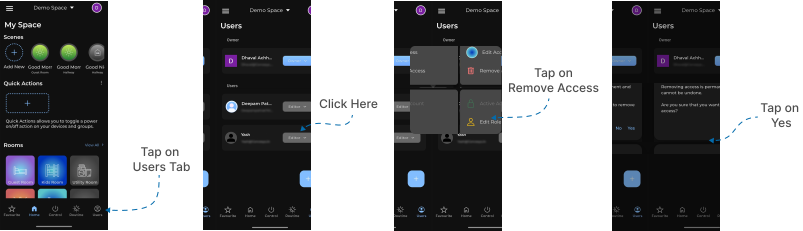
Once confirmed, the user will no longer have access to your account spaces.
All associated roles, permissions, and access privileges will be permanently removed.