Get Access
This guide explains how to Get Access in the Loft App.
This feature is used to receive access to another user's Loft account.
Watch The Video Tutorial
Steps to Get Access
-
Open the Loft App
-
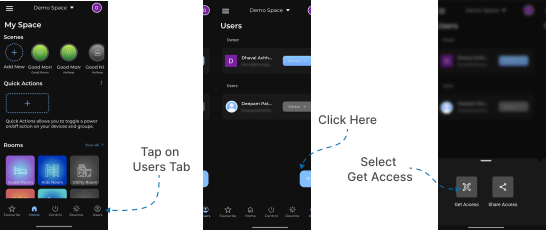
Navigate to the Users Section
- Go to the Users tab located at the bottom-right corner of the screen.
- Tap on the ‘+’ (Add) button.
- A popup will appear — select Get Access.
- Scan QR Code
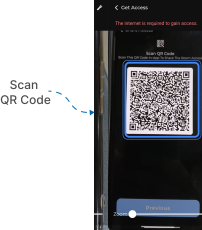
- The Get Access screen will appear with a camera scanner and a zoom slider to adjust the camera view.
- Scan the QR Code displayed on the other user’s Share Access screen (the account you want access to).
- Once the QR code is successfully scanned, you will gain access to their account based on the role and permissions granted.
Note: The level of control and visibility you receive depends on the access rights shared by the other user.