OTA Device
This guide explains how to OTA Device using the Loft App.
⚠️ Keep in mind: To OTA Device, the device must already be installed. If don't know how to install a device so click here.
Watch The Video Tutorial
Steps to OTA Device
-
Open the Loft App
- Navigate to the Room where your Device is installed.
-
Locate the Device
- Locate the Device which you want to OTA and click on the three dots
⁝icon.
- Locate the Device which you want to OTA and click on the three dots
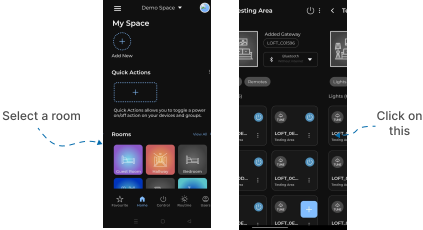
- Open Edit Menu
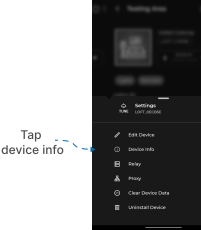
- A Settings Menu popup will appear with multiple options.
- Tap on Device Info.
- Device Info
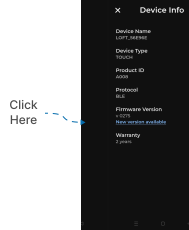
- An screen appears with All the Available Info of that Device.
- Locate Firmware Version.
- In that click on New version available.
- This wll checking for updates... If any New Version available that will shown in list otherwise shown No new update available.