Uninstall Device
This guide explains how to Uninstall Device using the Loft App.
⚠️ Keep in mind: To Uninstall Device, the device must already be installed. If don't know how to install a device so click here.
Watch The Video Tutorial
Steps to Uninstall Device
-
Open the Loft App
- Navigate to the Room where your Device is installed.
-
Locate the Device
- Locate the Device which you want to Uninstall and click on the three dots
⁝icon.
- Locate the Device which you want to Uninstall and click on the three dots
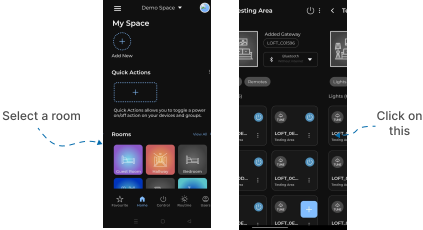
- Open Edit Menu
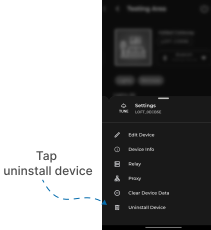
- A Settings Menu popup will appear with multiple options.
- Tap on Uninstall Device.
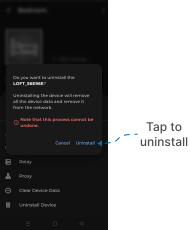
- Confirmation
- Note: Uninstalling the device will remove all the device data and also remove it from the network.
- Click on Uninstall to confirm uninstall Device.